

Best Practices
The Wolverine community wants you to be successful with Wolverine, so we're using this page to gather whatever advice we can offer. Some of this is generic advice for building maintainable systems on top of asynchronous messaging that would apply with any messaging or command executor tool, and some of it is specific to Wolverine itself. The page is organized in three parts:
- Organizing your code, where Wolverine has strong opinions
- Messaging and resiliency, where Wolverine mostly agrees with the rest of the messaging world
- Running Wolverine in production
TIP
Wolverine is purposely designed on the premise that lower code ceremony is valuable for maintainable code. Wolverine is also built to promote testability and to decouple business logic from infrastructure through the "A-Frame Architecture", or "Imperative Shell, Functional Core" if you're coming from a Functional Programming background. While Wolverine can happily be used with the Clean Architecture, that style is not what Wolverine is optimized for, and frankly, the Wolverine core team strongly recommends against any sort of heavily layered Hexagonal Architecture style.
Organizing Your Code
Vertical Slice Architecture
INFO
Despite its name, "Vertical Slice Architecture" is really just an idea about organizing code and not what we would normally think of as a true architectural pattern. You could technically follow a ports and adapters style like the Clean Architecture while still organizing your code in vertical slices instead of horizontal layers.
Wolverine has quite a few features specifically built to support a "Vertical Slice Architecture" code layout where the code is organized by feature or use case rather than by technical layer, and we think you can use Wolverine to create a maintainable codebase with far less complexity than the state of the art Clean/Onion layered approach.
Our default recommendation is to name a file after the command, event, or HTTP request it handles. A PlaceOrder.cs file might contain:
- The
PlaceOrdercommand or HTTP request body type itself - A validator, if you're using one of the validation integrations, as an inner type of the command so it stays in the same file
- The
PlaceOrderHandlerorPlaceOrderEndpointitself, including anyLoad/Validatemethods it needs
Closely related messages and handlers go in the same namespace. Message contract types that are shared across modules or applications can live in a separate library, but keep everything else about a slice together. Data access that is only germane to one slice belongs in that slice, right next to the behavior that uses it. We find that it's far more common to need to reason about a single system input than it ever is to need to reason about "the data access layer" as a whole.
A couple of corollaries that we've found helpful with JasperFx Software clients:
- If you're using Wolverine.HTTP, don't put Wolverine as a "mediator" underneath
GETendpoints. Use the persistence tooling directly in the query endpoint and lean on integration tests for the query side. - Don't let a shared "services" layer grow up because several slices happen to look alike. Use Wolverine middleware and compound handlers for shared concerns instead.
This organization has one more benefit that didn't exist when this page was first written. An AI coding agent's context window is finite, so the structure of your codebase is effectively part of every prompt. A slice that fits in one file is one an agent can read in full before changing it, while a feature smeared across six projects is not. The Critter Stack AI Skills encode the conventions on this page so that agents working in your codebase follow them too.
Read more:
- Vertical Slice Architecture tutorial
- Modular Monoliths
- Wolverine for MediatR Users
- Like Vertical Slice Architecture? Meet Wolverine.HTTP!
- The Codebase Is the Prompt: Wolverine, Vertical Slices, and AI-Assisted Development
The A-Frame Architecture
We're big fans of Jim Shore's "A-Frame Architecture" as a way to isolate business logic from infrastructure without resorting to oodles of abstractions and mock objects. Like "Vertical Slice Architecture", it's more about code organization than architecture. The idea is to divide the world up into three kinds of responsibilities:
- Logic that makes decisions: how to change the state of the application, or what should happen next
- Infrastructure services like a Marten
IDocumentSession, an EF CoreDbContext, or a gateway to another system - Coordination code sitting on top that delegates to both the infrastructure and the logic, while keeping the two apart
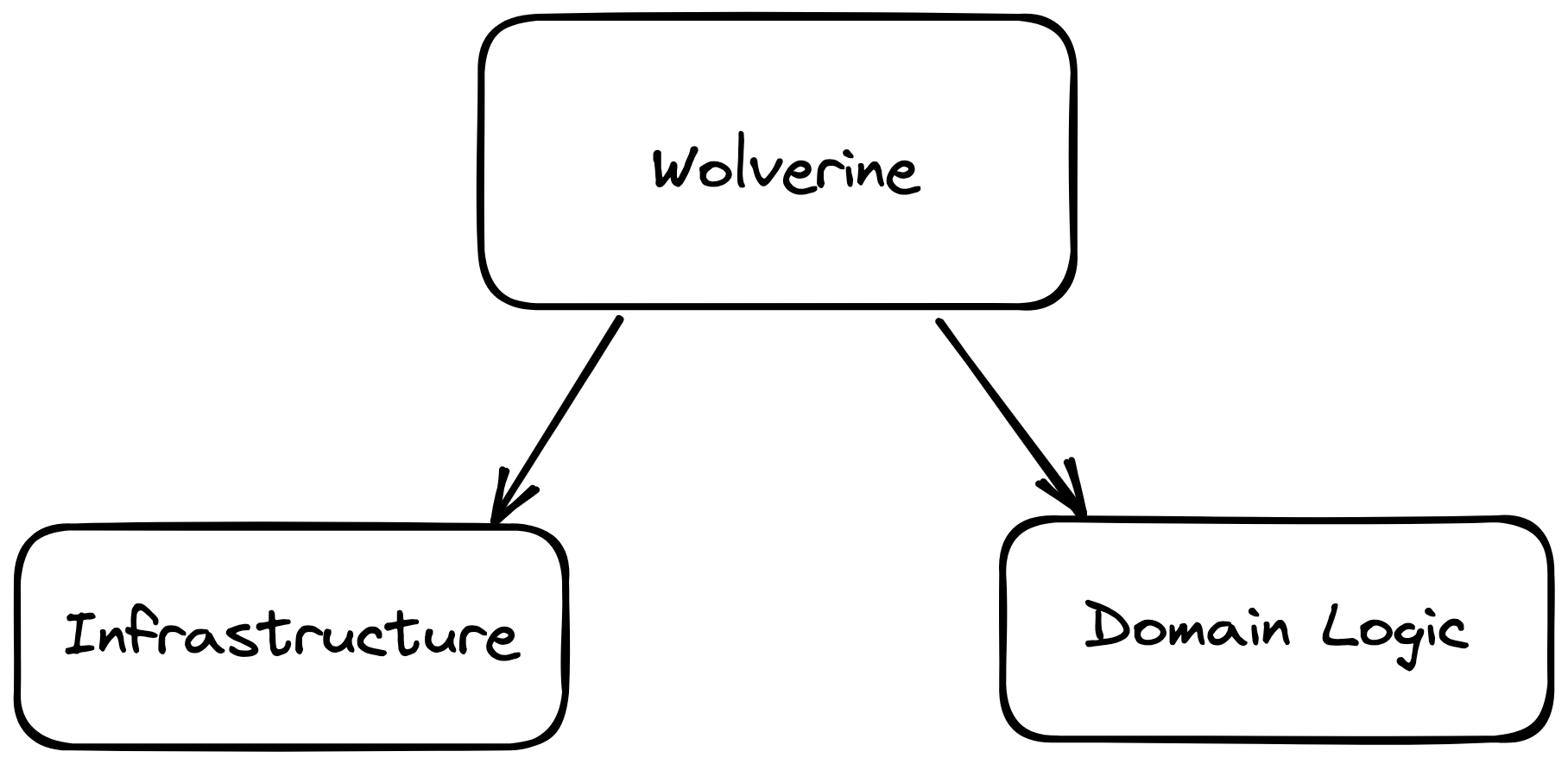
In Wolverine, the coordination role is played by the code Wolverine generates around your handler. Your handler methods are the logic, and they can stay pure functions because Wolverine supplies the infrastructure around them:
- "Compound handlers" let you split a handler into a
LoadAsync()method that fetches data and aHandle()method that receives that data as arguments and makes decisions - Declarative persistence with
[Entity]loads the entities a handler needs so the handler never touches the session, and the storage side effects likeStorage.Update()let the handler describe what to persist without doing it - Cascading messages let a handler return the messages it wants published instead of calling the bus
- Side effects let a handler return a description of any other action against infrastructure
- Transactional middleware commits the unit of work and flushes the outbox
- The aggregate handler workflow does all of the above for event sourcing with Marten, Polecat, or Fisher, with the handler as a "decider" function that returns new events
Here's what that looks like for a command that records a payment against an invoice:
public record RecordPayment(Guid InvoiceId, decimal Amount, DateTimeOffset PaidAt);

public static class RecordPaymentHandler
{
    // Wolverine calls this first by naming convention. Its only job is to
    // "set the table" for the main handler by loading the data it needs.
    // Note the single round trip for both documents with Marten's Include()
    public static async Task<(Invoice, InvoiceCustomer)> LoadAsync(
        RecordPayment command,
        IDocumentSession session,
        CancellationToken cancellation)
    {
        InvoiceCustomer? customer = null;
        var invoice = await session
            .Query<Invoice>()
            .Include<InvoiceCustomer>(x => x.CustomerId, c => customer = c)
            .Where(x => x.Id == command.InvoiceId)
            .FirstOrDefaultAsync(token: cancellation);

        if (invoice == null) throw new UnknownInvoiceException(command.InvoiceId);

        return (invoice, customer!);
    }

    // The main handler is a synchronous pure function. It receives the loaded
    // data as method arguments, makes decisions, and *describes* the outcome
    // through its return values. Wolverine does the rest.
    public static (IStorageAction<Invoice>, OutgoingMessages) Handle(
        RecordPayment command,
        Invoice invoice,
        InvoiceCustomer customer)
    {
        var messages = new OutgoingMessages();

        if (invoice.IsPaid)
        {
            // Nothing to persist, but somebody might care
            messages.Add(new InvoiceWasAlreadyPaid(invoice.Id));
            return (Storage.Nothing<Invoice>(), messages);
        }

        invoice.IsPaid = true;
        invoice.PaidAt = command.PaidAt;

        messages.Add(new InvoicePaid(invoice.Id, command.PaidAt));

        if (customer.SendPaymentReceipts)
        {
            messages.Add(new SendPaymentReceipt(invoice.Id, customer.Email));
        }

        return (Storage.Update(invoice), messages);
    }
}The decision logic is in Handle(), and it's a synchronous pure function. Every permutation of the business rules can be tested by pushing in an Invoice and an InvoiceCustomer and asserting on what comes back out:
public class RecordPaymentHandlerTests
{
    [Fact]
    public void paying_an_open_invoice_updates_it_and_publishes_invoice_paid()
    {
        // No database, no mocks, no host. Just inputs and outputs.
        var invoice = new Invoice { Id = Guid.NewGuid(), Amount = 100 };
        var customer = new InvoiceCustomer { Id = Guid.NewGuid(), SendPaymentReceipts = true, Email = "jane@acme.com" };
        var command = new RecordPayment(invoice.Id, 100, DateTimeOffset.UtcNow);

        var (action, messages) = RecordPaymentHandler.Handle(command, invoice, customer);

        action.ShouldBeOfType<Update<Invoice>>().Entity.IsPaid.ShouldBeTrue();
        messages.ShouldContain(x => x is InvoicePaid);
        messages.ShouldContain(x => x is SendPaymentReceipt);
    }

    [Fact]
    public void paying_an_already_paid_invoice_changes_nothing()
    {
        var invoice = new Invoice { Id = Guid.NewGuid(), Amount = 100, IsPaid = true };
        var customer = new InvoiceCustomer { Id = Guid.NewGuid() };
        var command = new RecordPayment(invoice.Id, 100, DateTimeOffset.UtcNow);

        var (action, messages) = RecordPaymentHandler.Handle(command, invoice, customer);

        action.ShouldBeOfType<Nothing<Invoice>>();
        messages.Single().ShouldBeOfType<InvoiceWasAlreadyPaid>();
    }
}Don't bother unit testing LoadAsync() on its own. Cover it with an integration test of the whole handler through a tracked session, or an Alba scenario for an HTTP endpoint.
When all the handler needs is a single entity by its identity, [Entity] removes the LoadAsync() method altogether, and Wolverine stops processing with a logged message (or a 404 or ProblemDetails for HTTP) if the entity doesn't exist, so the handler is left with only the happy path:
public record CancelInvoice(Guid InvoiceId, string Reason);
public record InvoiceCancelled(Guid InvoiceId, string Reason);

public static class CancelInvoiceHandler
{
    // [Entity] tells Wolverine to load the Invoice by the InvoiceId member of
    // the command. If it's missing, Wolverine logs that and stops processing
    // before this method is ever called, so the handler is left with only
    // the happy path.
    public static (Delete<Invoice>, InvoiceCancelled) Handle(
        CancelInvoice command,
        [Entity] Invoice invoice)
    {
        return (Storage.Delete(invoice), new InvoiceCancelled(invoice.Id, command.Reason));
    }
}And when a handler needs to do something to infrastructure that isn't persistence, return a side effect that describes the action. Wolverine finds the Execute() or ExecuteAsync() method on the returned object and calls it with whatever services it needs:
// A side effect is a return value that *describes* an action against
// infrastructure. Wolverine finds the Execute/ExecuteAsync method and
// calls it after the handler, with whatever services that method needs.
public class WriteReceiptFile : ISideEffect
{
    public WriteReceiptFile(string fileName, string contents)
    {
        FileName = fileName;
        Contents = contents;
    }

    public string FileName { get; }
    public string Contents { get; }

    public Task ExecuteAsync(ReceiptSettings settings, CancellationToken token)
    {
        var path = Path.Combine(settings.Directory, FileName);
        return File.WriteAllTextAsync(path, Contents, token);
    }
}

public class ReceiptSettings
{
    public string Directory { get; set; } = Environment.CurrentDirectory;
}

public static class SendPaymentReceiptHandler
{
    // Pure function: easy to unit test by asserting on the WriteReceiptFile
    // that comes back out, with no file system anywhere in sight
    public static WriteReceiptFile Handle(SendPaymentReceipt message)
    {
        return new WriteReceiptFile($"{message.InvoiceId}.txt", $"Receipt sent to {message.Email}");
    }
}TIP
Prefer init only properties or constructors with named arguments over positional records with several parameters of the same type. Transposing two Guid arguments is an easy mistake to make and a hard one to find in a large codebase.
Read more:
- A-Frame Architecture with Wolverine
- Testing Without Mocks: A Pattern Language by Jim Shore
- Railway Programming with Wolverine
- Unit Testing Aggregate Handlers
- Wolverine is the Undisputed Champion of Low Ceremony Code
Make All Side Effects Apparent from the Root Handler
INFO
This advice arose from Jeremy's involvement with a legacy system using a Wolverine competitor where a message handler had a huge dependency tree of services that depended on other services, and deep, deep down the call stack a service published a message through that service bus. The point here is to make your code easy to reason about by being able to scan a handler and see the side effects and outcomes of the original message.
Very frequently you'll need to publish additional messages from a message handler or HTTP endpoint. You can technically have the current IMessageBus injected into your handler's dependencies and publish messages deeper in your call stack, but we strongly recommend against that because it makes your system hard to reason about. Instead, as much as possible, publish outgoing messages only from the root handler method:
public record ApproveOrder(Guid OrderId);
public record OrderApproved(Guid OrderId);

public interface IApprovalRules
{
    bool CanAutoApprove(ApproveOrder command);
}

public static class ApproveOrderHandler
{
    // Preferred: the outgoing message is a return value, so anybody reading
    // this handler can see exactly what it might publish
    public static OrderApproved? Handle(ApproveOrder command, IApprovalRules rules)
    {
        // Use services to *decide*, then return the decision
        return rules.CanAutoApprove(command)
            ? new OrderApproved(command.OrderId)
            : null; // null means "no cascading message"
    }
}

public static class ApproveOrderExplicitHandler
{
    // Also fine if you prefer the explicit style. The side effect is still
    // visible from the root handler method
    public static async Task HandleAsync(ApproveOrder command, IApprovalRules rules, IMessageBus bus)
    {
        if (rules.CanAutoApprove(command))
        {
            await bus.PublishAsync(new OrderApproved(command.OrderId));
        }
    }
}Consider this an anti-pattern to avoid:
- Your message handler method calls a method on
IService1 - Which calls a method on
IService2 - Which calls
IMessageBus.PublishAsync()to publish a new message as part of the original message handling
This advice does not mean that every follow up step has to be a cascading message, just that the side effects of a message should be visible from its handler. If you're using EF Core with the "domain events" pattern where entities collect their own events, let Wolverine scrape those events from the DbContext inside the transaction rather than injecting a publisher into your entities. And calling IMessageBus.InvokeAsync() from inside another handler to "reuse" logic is guilty until proven innocent: it hides a nested transaction, hides the database round trips, and splits one unit of work into two that can fail independently.
Read more:
Keep Your Call Stacks Short
As a follow up to the previous section, we highly advise you to keep your "call stacks" short within message handlers. By "call stack" we mean how many different code files or types underneath the message handler you have to jump through to understand how a command or event is handled. What we've found in our own development is that for whatever value layering provides for loose coupling, it can do even more damage to your ability to reason about and modify the code as a whole.
There's a performance angle too. Round trips to the database are the dominant cost in most enterprise systems, and deep call stacks hide them. A handler that calls a service that calls a repository that loads one item at a time inside a loop is the classic case, and nobody can see the problem from any one of those files. When the data access is in the slice, next to the behavior that needs it, you can see the round trips and batch them with features like Marten's Include(), LoadManyAsync(), or batched queries, or batched entity loads in Wolverine.
For that reason we recommend against wrapping your persistence tooling in repository abstractions. Marten's IDocumentSession or an EF Core DbContext is already the abstraction, and a repository on top of it usually hides the features that reduce round trips while adding nothing but passthrough methods. When complex query logic really is shared between slices, pull it into a reusable query plan or specification rather than a repository.
Read more:
Prefer Validate() Methods for Business Rule Validation
Wolverine has several ways to validate incoming messages and HTTP requests, and the choice mostly comes down to where the rules live:
- Use a
Validate()orValidateAsync()method on the handler when the rules need services or the current system state, or when they only apply to that one handler. This keeps the rules beside the happy path, and the main method stays the happy path. AValidate()method can returnHandlerContinuation,ProblemDetailsfor HTTP, or just a collection of error strings. - Use Data Annotations when your message types already carry the attributes and you don't want separate validator classes.
- Use Fluent Validation when you need reusable, composable validators shared across several handlers or endpoints. Register validators as singletons where you can so Wolverine can inline them into the generated code.
Whichever you pick, Wolverine generates the validation middleware ahead of time, so there's no runtime penalty for any of them. And whichever you pick, don't wrap handler return values in Result<T> types to carry validation failures around. Let Wolverine stop the processing and report the problem.
Read more:
- Validation in message handlers
- Validation in HTTP endpoints
- Result Pattern or Exceptions for Errors? Wolverine Lets You Say "Neither"
Prefer Wolverine.HTTP Endpoints over "Wolverine as MediatR"
A very common pattern in the .NET ecosystem is an MVC Core controller action or a Minimal API registration whose only job is to delegate to a mediator, so every HTTP operation is really two things: the endpoint, and the handler behind it. You can certainly use Wolverine that way with IMessageBus.InvokeAsync(), and it's a reasonable first step when migrating an existing application. For new code though, we believe you can build simpler code with "just" a Wolverine.HTTP endpoint, where the endpoint method is the handler and there's only one thing to write, read, and test:
// Two things to maintain, and the controller is pure ceremony
[HttpPost("/api/invoices/{id}/cancel")]
public async Task<IActionResult> Cancel(Guid id, CancelInvoice command, IMessageBus bus)
{
    var result = await bus.InvokeAsync<Result<InvoiceCancelled>>(command with { InvoiceId = id });
    return result.IsSuccess ? Ok(result.Value) : NotFound(result.Error);
}

// One thing. Wolverine answers the 404 for a missing invoice itself,
// and the method is a pure function of its inputs
[WolverinePost("/api/invoices/{id}/cancel")]
public static (InvoiceCancelled, Delete<Invoice>) Cancel(
    CancelInvoice command,
    [Entity] Invoice invoice)
{
    return (new InvoiceCancelled(invoice.Id, command.Reason), Storage.Delete(invoice));
}
Everything described in the A-Frame section above works the same way in an HTTP endpoint, and a couple of features are specifically there to replace the plumbing that the controller used to carry:
- A
Validate()method on the endpoint acts as a filter. ReturnProblemDetailsand Wolverine stops the request with a 400, or returnWolverineContinue.NoProblemsto carry on, with the OpenAPI metadata for the 400 generated for you. - The persistence helpers like
[Entity]load what the endpoint needs from the route, query string, or request body, and answer the 404 (or 400, or 204, your choice) for a missing entity without any code in the endpoint. - The outgoing messages, storage side effects, and transactional middleware all apply, so an endpoint that changes the database and publishes an event gets the transactional outbox for free.
That also means you don't need the custom Result<T> or OneOf<> return types that are so common with "Mediator" tooling. Those types exist to carry a failure back up through the controller so it can pick a status code, and with Wolverine.HTTP there is no controller to carry it to. Let the endpoint return its happy path, and let Validate() and [Entity] deal with the rest.
Read more:
- Wolverine.HTTP
- Migrating from Minimal APIs and Migrating from MVC Controllers
- HTTP Validation and ProblemDetails
- Result Pattern or Exceptions for Errors? Wolverine Lets You Say "Neither"
Messaging and Resiliency
Design Messages as Small, Immutable Contracts
Messages are contracts between the code that sends them and the code that handles them, frequently across deployment boundaries, so they deserve a little more care than ordinary types:
- Name commands in the imperative and events in the past tense. A command is
DoSomething(PlaceOrder), has one logical owner, and is sent to it. An event isSomethingHappened(OrderPlaced), describes a fact, and is published to whoever cares. There is no difference between the two in Wolverine's implementation. A command and an event are both just messages, and the distinction is only their role within your system, but the naming idiom makes that role obvious to everyone reading the code. - Messages are data, not behavior. Use records or classes with
initproperties. Don't reuse your EF Core entities, Marten documents, or view models as messages, because every one of those has a reason to change that your subscribers don't share. - Keep events thin. Prefer identities and the facts that changed over a copy of the whole entity. Fat events couple every subscriber to the publisher's model, and if a payload really is too big for your broker, use a claim check rather than pushing it through the queue.
- Version additively. Add nullable properties, deploy the receivers before the senders, and only introduce a new versioned message type for a breaking change. Keep the old handler until in-flight messages drain.
Read more:
Dividing Handlers
Wolverine does not require any explicit assignment of message handlers to endpoints (a Rabbit MQ queue, an AWS SQS queue, a Kafka topic, a local queue). By default, every message type gets its own local queue and conventional routing takes care of external brokers. You'll frequently want to go further than the defaults though, because an endpoint is your unit of parallelism, ordering, and failure isolation:
- Isolate expensive work. Put expensive or slow message types on their own endpoint with capped parallelism so they can never starve the cheap, high volume messages, and never let a one second message wait behind a sixty second batch job.
- Give high volume work room. Cheap messages can go on a buffered or durable endpoint with plenty of parallelism.
- Pay for ordering only where you need it. Competing consumers break message ordering, and that's the normal, healthy state of a messaging system. Where order matters, use
Sequential()for one at a time processing on a node,ListenWithStrictOrdering()for one at a time across the whole cluster, or partitioned processing to keep messages for the same entity in order while everything else runs in parallel. Each of those costs throughput, so make the decision per endpoint. - Use global partitioning for concurrency protection. When the real problem is two nodes handling messages for the same aggregate, saga, or tenant at the same time, global partitioning routes every message for the same group id to the same node, and processes them one at a time there, without a lock anywhere.
- Isolate failures. If two handlers subscribe to the same event, a failure or a slowdown in one shouldn't block the other.
public static async Task configure()
{
    using var host = await Host.CreateDefaultBuilder()
        .UseWolverine(opts =>
        {
            opts.UseRabbitMq().AutoProvision();

            // Expensive work gets its own queue with capped parallelism so
            // it can never starve anything else
            opts.ListenToRabbitQueue("expensive")
                .ProcessInline()
                .ListenerCount(2);
            opts.PublishMessage<ExpensiveReportRequest>().ToRabbitQueue("expensive");

            // Cheap, high volume messages get a buffered endpoint with
            // plenty of parallelism
            opts.ListenToRabbitQueue("notifications")
                .BufferedInMemory()
                .MaximumParallelMessages(20);
            opts.PublishMessage<CheapNotification>().ToRabbitQueue("notifications");

            // When ordering matters more than throughput, process one at a
            // time on exactly one node in the cluster
            opts.ListenToRabbitQueue("ledger")
                .ListenWithStrictOrdering();
            opts.PublishMessage<AccountLedgerEntry>().ToRabbitQueue("ledger");

            // The same knobs apply to local, in-process queues
            opts.LocalQueueFor<CheapNotification>()
                .MaximumParallelMessages(8);
        }).StartAsync();
}When the same message type has more than one handler, use sticky handlers to give each handler its own endpoint, or the Separated multiple handler behavior to do that for every message type in a modular monolith:
public record ProductUpdated(Guid ProductId);

// The same event is handled by two different handlers, and each handler
// gets its own queue. A failure or a slowdown in one never touches the other.
[StickyHandler("search-index")]
public static class ProductSearchIndexHandler
{
    public static void Handle(ProductUpdated message)
    {
        // update the search index
    }
}

[StickyHandler("pricing-cache")]
public static class ProductPricingCacheHandler
{
    public static void Handle(ProductUpdated message)
    {
        // refresh the pricing cache
    }
}While Wolverine will happily allow you to implement multiple message handler methods or HTTP endpoints in the same class, you may get better results by only allowing a single message handler method per class, especially for larger, more complex handlers. Wolverine's compound handler conventions also apply per class, so a LoadAsync() method meant for one message type can trip over a second message type in the same class.
Divide Work Along Transaction and Retry Boundaries
The more valuable way to divide handlers has nothing to do with endpoints though. It's about making each handler cover one transaction and one kind of failure. A handler that updates the database and calls an external web service and sends an email is three different things that fail in three different ways, and one retry policy can't be right for all of them. Retrying the whole handler after the web service times out re-runs the database work, and holds that transaction open for as long as the web service takes to answer.
So split it. The first handler does the database work inside one transaction and cascades a message for each follow up step. Each follow up step gets its own small handler with a retry loop sized for the thing it talks to:
public record PlaceOrder(Guid OrderId, Guid CustomerId, decimal Amount);
public record OrderPlaced(Guid OrderId);
public record NotifyShipper(Guid OrderId);

// Step 1: the database transaction. This commits quickly, and the call to
// the shipping service becomes a cascading message instead of a direct call
// inside this transaction
public static class PlaceOrderHandler
{
    public static (Insert<ShippableOrder>, OrderPlaced, NotifyShipper) Handle(PlaceOrder command)
    {
        var order = new ShippableOrder
        {
            Id = command.OrderId,
            CustomerId = command.CustomerId,
            Amount = command.Amount
        };

        return (Storage.Insert(order), new OrderPlaced(order.Id), new NotifyShipper(order.Id));
    }
}

// Step 2: the call to the external web service, in its own handler with its
// own retry loop. A flaky shipping API retries here on its own schedule,
// without re-running the database work and without holding the first
// transaction open while it waits
public static class NotifyShipperHandler
{
    public static void Configure(Wolverine.Runtime.Handlers.HandlerChain chain)
    {
        chain.OnException<HttpRequestException>()
            .RetryWithCooldown(1.Seconds(), 5.Seconds(), 30.Seconds())
            .WithFullJitter()
            .Then.MoveToErrorQueue();
    }

    public static Task Handle(NotifyShipper command, IShippingGateway gateway, CancellationToken token)
    {
        return gateway.RequestShipmentAsync(command.OrderId, token);
    }
}Some rules of thumb for where to cut:
- One transaction per handler. If a handler needs two database transactions, it's two handlers with a message in between.
- Every call to an external system gets its own handler. That's where the transient failures live, and that's where a retry loop with a cooldown belongs, isolated from everything else. It also removes the temporal coupling: if the shipping service is down for an hour, orders still get placed, and the
NotifyShippermessages wait in the queue until it's back. - Anything that should be able to fail independently is its own handler. Sending the receipt email failing shouldn't roll back the order.
- Let the outbox connect the steps. Because the cascading messages are persisted in the same transaction as the database work on a durable endpoint, the follow up steps are guaranteed to happen eventually, and never happen for a transaction that rolled back.
The result is a workflow made of small, atomic handlers rather than one long transaction script, which is also exactly the shape that is easiest to retry, to observe, and to unit test.
Read more:
- Developing Error Handling Strategies for Asynchronous Messaging
- Multi Step Workflows with the Critter Stack
- Message Concurrency, Parallelism, and Ordering with Wolverine
- Listening Endpoints
- Partitioned Processing
- Wolverine's Production-Capable In-Memory Queues
Design for At-Least-Once Delivery
Every message broker and every durable queue in Wolverine delivers messages at least once. A broker can lose an acknowledgement, a node can crash after handling a message and before acknowledging it, and a retry policy is by definition a repeat delivery. The communities around every messaging tool we know of agree on this one, so plan for it:
- Prefer naturally idempotent handlers. A command that sets an absolute state ("set the thermostat to 68") is safe to repeat. A command that applies a delta ("raise the thermostat by two degrees") is not. Upserts and unique constraints are your friends.
- Dedup by message identity when the operation can't be idempotent. Wolverine's transactional inbox on durable endpoints tracks handled messages by their envelope identity in the same transaction as your business data, and the idempotency guide covers the options for buffered and inline endpoints. That protects you from the same delivery being handled twice. It does not protect you from the same intent being sent twice: an operator clicking a button twice, a client retrying an HTTP call after a timeout, a scheduler republishing an occurrence. For that, use Wolverine's logical message deduplication to declare a business identity for the message (an order id, an idempotency key from the caller), and Wolverine will refuse the second one within a configurable window.
- The outbox and inbox do not make your handlers exactly-once. They remove one class of inconsistency. Idempotent business logic or logical deduplication is still what makes a repeat delivery harmless, and you need one of the two.
- Don't rely on ordering. Competing consumers, retries, and recovery after a crash all reorder messages. Handlers that are order-independent are the cheapest kind. When a workflow genuinely must process messages in sequence and they can arrive out of it, the
ResequencerSagabuffers out of order messages and releases them in order. - Put long running handlers on durable endpoints. Brokers put a clock on an unacknowledged delivery (the SQS visibility timeout, the Azure Service Bus lock duration), and a handler that outlives the clock gets its message redelivered to another node while it's still running. A durable endpoint acknowledges the broker as soon as the message is persisted in the inbox, so the handler can take as long as it needs.
- Keep sagas to orchestration. A saga should load its own state, decide, and send or publish messages. Delegate any I/O to the handlers it commands, keep its transactions short, assume that messages can arrive out of order (including the one that starts it), and give every saga a way to end, even if that's a scheduled timeout message.
- Test it. Handle the same message twice in a test and assert that the second time changed nothing.
Read more:
- Idempotency in Messaging
- Idempotent Message Delivery and Logical Deduplication
- Idempotency Keys for HTTP
- Sagas
- Dealing with Concurrency
Prefer Purely Asynchronous Processing
Wolverine supports request/reply over messaging through IMessageBus.InvokeAsync<T>() to a remote endpoint, and the response comes back over the broker. It's a useful tool, but it reintroduces exactly the temporal coupling that asynchronous messaging was supposed to remove: the caller is blocked, the timeout is now your problem, and a slow or missing responder fails the caller. As much as possible, we recommend designing workflows as purely asynchronous processing with cascading messages, where each step publishes what happened and the next step reacts. Reserve request/reply for sparing, low volume usages where a caller truly can't proceed without the answer.
Read more:
Lean on Wolverine Error Handling
Rather than explicitly catching exceptions in message handlers, lean on Wolverine's configurable error handling policies. This saves you explicit code that obfuscates your actual functionality, while still providing robust responses to errors and Wolverine's built in observability (error logging, circuit breakers, execution statistics). A caught and swallowed exception is the worst outcome of all: the message is consumed, nothing is retried, and nothing is logged.
A good set of policies starts by sorting the errors you expect into categories, because the right response is different for each, and Wolverine has a policy for each one:
- Transient or concurrency errors like network timeouts, database connectivity hiccups, or optimistic concurrency conflicts resolve themselves. Retry with a cooldown and jitter, then dead letter the message if that doesn't work.
- A dependency outage where some system is rejecting all input. Requeue the message and pause the whole listener rather than retrying message by message.
- A distressed resource where a high percentage of all messages on an endpoint are failing. Let a circuit breaker pause processing until it recovers.
- Permanently invalid messages that can never succeed. Never retry these. Discard them, or move them to the error queue if somebody might want to look later.
public static async Task configure()
{
    using var host = await Host.CreateDefaultBuilder()
        .UseWolverine(opts =>
        {
            // 1. Transient or concurrency errors. Retry a few times with a
            //    short, growing cooldown. Jitter keeps a cluster of nodes
            //    from retrying in lockstep against a recovering database.
            //    If that doesn't work, keep the message around for a human.
            opts.Policies.OnException<TimeoutException>()
                .RetryWithCooldown(50.Milliseconds(), 100.Milliseconds(), 250.Milliseconds())
                .WithFullJitter()
                .Then.MoveToErrorQueue();

            // 2. A dependency is down. Retrying every message one at a time
            //    just floods your logs and your dead letter queue. Put the
            //    message back and pause the whole listener instead.
            opts.Policies.OnException<SystemIsCompletelyUnusableException>()
                .Requeue().AndPauseProcessing(5.Minutes());

            // 3. A message that can never succeed. Don't retry, don't pause,
            //    just get it out of the way. Use MoveToErrorQueue() instead
            //    if somebody might want to look at it later.
            opts.Policies.OnException<InvalidMessageYouWillNeverBeAbleToProcessException>()
                .Discard();

            // 4. A distressed resource. If a high percentage of *all* messages
            //    on an endpoint are failing, trip a circuit breaker and give
            //    the resource a chance to recover
            opts.ListenToRabbitQueue("incoming")
                .CircuitBreaker(cb =>
                {
                    cb.MinimumThreshold = 10;
                    cb.TrackingPeriod = 5.Minutes();
                    cb.FailurePercentageThreshold = 10;
                    cb.PauseTime = 1.Minutes();
                });
        }).StartAsync();
}Rules fall through in order, so put the specific exception types before the general ones. Rules can be global, per message type, or per handler through a Configure(HandlerChain) method on the handler class. Purely functional bugs should mostly be caught by testing before any of this matters.
A corollary that bit us: don't silently return from a handler when a guard clause fails. Nobody will ever find out why the work stopped happening. Throw a specific exception and tell Wolverine what to do with it:
public class LicenseRequiredException : Exception;

public static class LicenseGuard
{
    public static bool IsOperationAllowed() => true;
}

public record GenerateReport(Guid ReportId);

public static class GenerateReportHandler
{
    public static void Handle(GenerateReport command)
    {
        // Don't do this. The message is silently consumed, nothing is logged,
        // and nobody ever finds out why reports stopped being generated:
        //
        // if (!LicenseGuard.IsOperationAllowed()) return;

        // Do this instead, and let the error policy below decide what happens
        if (!LicenseGuard.IsOperationAllowed())
        {
            throw new LicenseRequiredException();
        }

        // generate the report...
    }
}

public static class GuardClauseConfiguration
{
    public static async Task configure()
    {
        using var host = await Host.CreateDefaultBuilder()
            .UseWolverine(opts =>
            {
                // Retrying can never help, so just discard the message.
                // Wolverine logs the discard, and the exception shows up
                // in tracked session test output
                opts.Policies.OnException<LicenseRequiredException>().Discard();
            }).StartAsync();
    }
}Lastly, your dead letter queue needs an owner. Nothing cleans it up automatically, a growing dead letter queue is the clearest signal you have that something is wrong, and replaying from it is a decision somebody has to make. Put it on a dashboard and alert on it. CritterWatch does exactly that across a fleet of Wolverine applications, with dead letter triage grouped by message and exception type, replay, and alerting. And now that the dead letter queue is exposed through CritterWatch's MCP server, you can also point an LLM agent at it to summarize what's failing, interpret the exception patterns, and propose which messages are safe to replay and which should be discarded.
Read more:
- Error Handling
- Dead Letter Queues
- Developing Error Handling Strategies for Asynchronous Messaging
- CritterWatch 1.1: Dead Letter Management
- Interrogating Your System with the CritterWatch MCP Server
Decide on the Transactional Outbox Early
If a message handler or HTTP endpoint changes the database and publishes messages, you have a consistency problem the moment one of those succeeds and the other doesn't. The transactional outbox solves that by persisting outgoing messages in the same transaction as your business data, and the inbox solves the mirror image problem for incoming messages. It's dramatically easier to build on from the start than it is to retrofit, so decide early:
- Use durable endpoints wherever losing a message would be a real problem. Buffered endpoints are fine for cheap, replaceable work like cache invalidation.
- The outbox does not replace a durable broker, retry policies, or idempotent handlers. It removes one class of inconsistency, and the rest are still yours. See the at-least-once section above for the deduplication options.
- Use
DeliverWithin()or message expiration for messages that go stale, so a long outage doesn't end with a flood of work nobody wants done anymore. - Use optimistic concurrency when loading aggregates or sagas for writes, and retry on the concurrency exception.
Read more:
- Durable Messaging
- Build Resilient Systems with Wolverine's Transactional Outbox
- Claim Checks for payloads too big for your broker
Avoid Abstracting Wolverine
This is generic advice for just about any infrastructure tool, and the NServiceBus and MassTransit teams give it too. You will lose out on Wolverine functionality by trying to abstract it, and very likely just create an abstraction that mimics a subset of Wolverine for little gain.
If you are concerned about the testability of your message handlers, use cascading messages and the rest of the A-Frame approach above, which removes the need for an abstraction in the first place. For integration tests, Wolverine's tracked sessions see everything that happened as a result of a message, and you can stub message handlers or stub all external transports when you need to isolate the application.
Running Wolverine in Production
Pre-Generate Types to Optimize Production Usage
Wolverine has admittedly an unusual runtime architecture in that it depends much more on runtime generated code than the IoC container tricks that many other .NET frameworks use. That's great for performance and it's what enables Wolverine's low ceremony code, but it comes with a potentially significant memory usage and cold start cost if the code is generated and compiled at runtime.
Our recommendation is to generate the code at build time with dotnet run -- codegen write, run with TypeLoadMode.Static in production, and keep the WolverineFx.RuntimeCompilation package registered only in development. Your production image never needs to invoke Roslyn, and if a handler is missing from the pre-generated code you'll find out at startup instead of at 3 AM.
Read more:
IoC Container Usage
TIP
Wolverine tries very hard not to use an IoC container at runtime. We recommend using as little runtime IoC resolution as possible and preferring method injection in handlers. That said, for the many ASP.Net Core middleware tools that use a scoped IoC container per request to smuggle state between middleware and your HTTP endpoints, Wolverine has you covered now: Wolverine.HTTP can opt into sharing the HttpContext.RequestServices scope with the rest of the ASP.Net Core pipeline, for every service or just for the ones that need it.
You'll get better performance and better results all around if you avoid "opaque" service registrations in your IoC container that force runtime resolution. In effect, this means staying away from Scoped or Transient lambda registrations. Wolverine can inline a service with a simple constructor directly into the generated code, but a lambda is a black box that has to be resolved through a scoped container every time.
The registration below is the worst case, because the IMessageBus it resolves is a completely different object from the MessageContext Wolverine is using to track the current message:
public static void configure(IServiceCollection services)
{
    // Don't do this. The IMessageBus resolved here is a brand new object
    // with no relationship to the message Wolverine is currently handling,
    // so TenantId (and everything else) will be wrong
    services.AddScoped<ITenantedService>(s =>
    {
        var bus = s.GetRequiredService<IMessageBus>();
        return new TenantedService(bus.TenantId ?? "*DEFAULT*");
    });
}This might be more preference than hard advantage (it is a performance improvement though), but the Wolverine team recommends method injection over constructor injection:
// Wolverine prefers this:
public static class Message1Handler
{
    public static Task HandleAsync(Message1 message, IService service)
    {
        // Do stuff
    }
}

// This certainly works with Wolverine, but it's more code and more
// runtime overhead
public class Message1Handler
{
    private readonly IService1 _service1;

    public Message1Handler(IService1 service1)
    {
        _service1 = service1;
    }

    public Task HandleAsync(Message1 message)
    {
        // Do stuff
    }
}
By and large, Wolverine wants you to use fewer abstractions and keep a shorter call stack. See the earlier section about the A-Frame Architecture for alternatives to jamming more abstracted services into an IoC container in order to create separation of concerns and testability.
Troubleshooting
When familiarizing yourself with Wolverine, it can be daunting to troubleshoot the failure modes of the different approaches to IoC and dependency management. Below are some steps to take if you run into issues.
Preview the generated code with dotnet run -- codegen preview, or write it out with dotnet run -- codegen write and look in the ./Internal/Generated/WolverineHandlers/ folder for the creation of an IServiceScope:
using var serviceScope = _serviceScopeFactory.CreateScope();If that line is present, every service resolved through that scope is cut off from the Wolverine runtime. In practice, that means a service resolved through an IServiceProvider that depends on the current Envelope or IMessageContext will see the wrong objects for the current message:
// Any service that gets IMessageContext (or Envelope) from an IServiceProvider
// it was handed is looking at a *different* context than the one Wolverine
// is using for the current message. The tenant id below is going to be wrong.
public class BadService(IServiceProvider serviceProvider)
{
    public void DoThings()
    {
        var context = serviceProvider.GetRequiredService<IMessageContext>();
        Console.WriteLine($"Current tenant id is {context.TenantId}");
    }
}

// Take the context directly as a dependency instead, and Wolverine hands
// you the real one
public class GoodService(IMessageContext context)
{
    public void DoThings()
    {
        Console.WriteLine($"Current tenant id is {context.TenantId}");
    }
}Read more:
- Wolverine Code Generation and IoC
- Allow List for Service Location
- Diagnosing a Wolverine Application from the Command Line
Attaining IMessageBus
The Wolverine team recommendation is to use cascading messages as much as possible to publish additional messages, but when you do need an IMessageBus, take it as a method argument on your handler or HTTP endpoint:
public static class ReindexCatalogHandler
{
    // Prefer cascading messages, but when you do need the bus, take it as a
    // method argument and Wolverine will hand you the one for the current message
    public static async Task HandleAsync(ReindexCatalog command, IMessageBus bus)
    {
        await bus.PublishAsync(new ProductUpdated(Guid.NewGuid()));
    }
}Constructor injection works too, if you really prefer the little extra ceremony. What you should never do is resolve IMessageBus at runtime from a scoped container, as shown in the previous section.
Use the Diagnostics
Before you reach for the debugger, let Wolverine tell you what it thinks your application looks like:
# Everything Wolverine knows: handlers, endpoints, routing, storage
dotnet run -- describe

# Why does this message route where it does?
dotnet run -- wolverine-diagnostics describe-routing CreateOrder --explain

# What code is Wolverine actually running for this handler?
dotnet run -- codegen preview
In production, Wolverine emits OpenTelemetry spans and metrics for every message, with correlation and causation identifiers propagated across hops. Put the queue depths, the retry rate, and the dead letter queue on a dashboard, because those three numbers find most problems before your users do.
Read more:
- Diagnosing a Wolverine Application from the Command Line
- Diagnostics
- Logging, Metrics, and Open Telemetry
- Health Checks
Graceful Shutdown of Nodes
Wolverine 3.0 made Wolverine a lot more tolerant of how an application is shut down, and every major release since has improved on that: listeners drain their in-flight work before stopping, the leader reassigns the listeners and agents of a node that disappears, and the transactional inbox recovers anything that didn't finish. So you don't need to worry about this during development. Debug, kill the process, and get on with it.
In production it's still worth getting right. Wolverine runs in Balanced mode by default, which means a cluster of nodes coordinating the ownership of listeners and agents, and a node that leaves gracefully hands its work off immediately while a node that disappears has to be detected as stale by health checks first. In-flight messages on durable endpoints are recovered either way, but the handoff is faster and quieter when the process gets a TERM signal and enough time to drain. If you're running in a container, make sure the orchestrator sends that signal and waits before killing the process. See Pod termination for Kubernetes.
Read more: